Proactively Monitor Azure Service Retirements with AzRetirementMonitor
Learn how to proactively monitor Azure service retirements across multiple subscriptions using the AzRetirementMonitor PowerShell module, helping you avoid disruptions and maintain compliance.
Azure’s cloud platform evolves rapidly, bringing new capabilities and improvements regularly. However, this evolution also means that older services, features, and APIs are periodically retired or deprecated. Missing these retirement notifications can lead to unexpected service disruptions, security vulnerabilities, compliance issues, and costly emergency migrations.
Azure provides several built-in tools to help you stay informed about retirements, including the Azure Advisor Retirements Workbook, Service Health alerts, and notifications within the Azure portal. These are excellent resources that many organizations rely on. However, different teams often need different approaches based on their workflows, automation requirements, and operational preferences.
To provide an additional option for retirement monitoring, I built AzRetirementMonitor, a PowerShell module that helps you proactively identify Azure resources affected by upcoming retirements by querying Azure Advisor for service upgrade and retirement recommendations across all your subscriptions. This tool complements existing Azure monitoring capabilities by offering a PowerShell-native approach that can be easily integrated into scripts, automation workflows, and CI/CD pipelines.
The Problem: Why Service Retirement Monitoring Matters
As organizations scale their Azure presence, keeping track of retirement notices becomes increasingly difficult. Consider these scenarios:
- A critical VM size you’re using is being retired in 90 days
- An API version your application depends on will stop working next month
- A storage service tier is being deprecated, requiring data migration
- A security feature is being replaced with a different implementation
While Azure provides several ways to monitor retirements, not every team or workflow fits neatly into those tools. Teams working outside of the Azure portal with PowerShell or other tool sets may benefit from having retirement data available in their existing automation workflows. AzRetirementMonitor provides this capability by offering automated, centralized visibility into all retirement recommendations across your Azure estate through familiar PowerShell commands.
What is AzRetirementMonitor?
AzRetirementMonitor is an open-source PowerShell module that retrieves Azure Advisor service upgrade and retirement recommendations. It specifically focuses on HighAvailability category recommendations with the ServiceUpgradeAndRetirement subcategory, giving you a filtered view of exactly what matters for service continuity.
With version 2.0, the module has been completely redesigned to use the Az.Advisor PowerShell module by default, providing full parity with Azure Advisor while maintaining an optional API mode for advanced scenarios.
Key Features
- Az.Advisor integration: Default mode uses native PowerShell cmdlets with full Azure Advisor parity
- Multi-subscription support: Scan all your Azure subscriptions in one command
- Flexible authentication: Works with standard Azure PowerShell authentication (Connect-AzAccount)
- API mode available: Optional REST API mode for advanced scenarios via
-UseAPIswitch - Multiple export formats: Generate reports in CSV, JSON, or HTML
- Detailed recommendations: Get actionable solutions with links to documentation
- Cross-platform compatibility: Supports both PowerShell Desktop 5.1 and PowerShell Core 7+
Version 2.0.0 - Breaking Changes
Version 2.0.0 introduces a major architectural change in how the module works:
What Changed:
- Default behavior: Now uses Az.Advisor PowerShell module (full parity with Azure Advisor)
- API mode: Available via
-UseAPIswitch onGet-AzRetirementRecommendation - Connect-AzRetirementMonitor: Now only needed for API mode and requires
-UsingAPIswitch - PowerShell compatibility: Now supports both PowerShell Desktop 5.1 and PowerShell Core 7+
Migration Guide from v1.x
Old workflow (v1.x):
1
2
Connect-AzRetirementMonitor
Get-AzRetirementRecommendation
New workflow (v2.0) - Recommended:
1
2
3
# Default method (uses Az.Advisor module)
Connect-AzAccount
Get-AzRetirementRecommendation
New workflow (v2.0) - API Mode:
1
2
3
# API method (if you prefer the REST API)
Connect-AzRetirementMonitor -UsingAPI
Get-AzRetirementRecommendation -UseAPI
Getting Started
Prerequisites
You will need:
- PowerShell 5.1 or later (both Desktop and Core editions supported)
- Az.Accounts PowerShell module for authentication
- Az.Advisor PowerShell module (for default mode - automatically installed with Az module)
- Appropriate permissions to read Azure Advisor recommendations
Installation
The easiest way to install AzRetirementMonitor is from the PowerShell Gallery:
1
Install-Module -Name AzRetirementMonitor -Scope CurrentUser
Alternatively, you can clone the repository from GitHub:
1
2
git clone https://github.com/cocallaw/AzRetirementMonitor.git
Import-Module ./AzRetirementMonitor/AzRetirementMonitor.psd1
Quick Start
For detailed quick start instructions, check out the Quick Start Guide in the repository.
Simplest usage (recommended):
1
2
3
4
5
6
7
8
# 1. Connect to Azure
Connect-AzAccount

# 2. Get retirement recommendations
Get-AzRetirementRecommendation

# 3. Export to HTML report
Get-AzRetirementRecommendation | Export-AzRetirementReport -OutputPath "report.html" -Format HTML
Authentication
Default Mode: Az.Advisor (Recommended)
The default and recommended approach uses standard Azure PowerShell authentication:
1
2
3
4
5
# Connect to Azure (standard Azure PowerShell)
Connect-AzAccount

# Get retirement recommendations (uses Az.Advisor automatically)
Get-AzRetirementRecommendation
This method provides full parity with Azure Advisor and is the most reliable approach for most users.
API Mode: REST API
If you prefer to use the Azure Advisor REST API directly, you can use API mode:
1
2
3
4
5
6
7
8
# Connect the module in API mode
Connect-AzRetirementMonitor -UsingAPI

# Get retirement recommendations via API
Get-AzRetirementRecommendation -UseAPI

# Disconnect when finished (API mode only)
Disconnect-AzRetirementMonitor
Note: The API mode requires the -UsingAPI switch on Connect-AzRetirementMonitor and the -UseAPI switch on Get-AzRetirementRecommendation. This mode is useful for scenarios where you need direct REST API access or want to avoid Az.Advisor module dependencies.
Using AzRetirementMonitor
Basic Usage
Once authenticated, getting retirement recommendations is straightforward:
1
2
3
4
5
# Get all retirement recommendations across all subscriptions (default Az.Advisor mode)
Get-AzRetirementRecommendation

# Or using API mode
Get-AzRetirementRecommendation -UseAPI
The function automatically filters for HighAvailability category recommendations with ServiceUpgradeAndRetirement subcategory, ensuring you only see retirement-specific recommendations.
The output includes:
- Subscription ID and resource ID
- Resource name and category
- Impact level (High, Medium, Low)
- Problem description
- Recommended solution
- Links to documentation
- Last updated timestamp
- Recommendation ID for tracking
Targeting Specific Subscriptions
If you want to focus on particular subscriptions:
1
2
3
4
5
# Using default Az.Advisor mode
Get-AzRetirementRecommendation -SubscriptionId "sub-id-1", "sub-id-2"

# Using API mode
Get-AzRetirementRecommendation -SubscriptionId "sub-id-1", "sub-id-2" -UseAPI
Generating Reports
Export recommendations to share with your team:
1
2
3
4
5
6
7
8
# CSV for spreadsheet analysis
Get-AzRetirementRecommendation | Export-AzRetirementReport -OutputPath "report.csv" -Format CSV

# JSON for programmatic processing
Get-AzRetirementRecommendation | Export-AzRetirementReport -OutputPath "report.json" -Format JSON

# HTML for easy viewing and sharing
Get-AzRetirementRecommendation | Export-AzRetirementReport -OutputPath "report.html" -Format HTML
The HTML report provides a clean, formatted view of all retirement recommendations that’s easy to share with stakeholders:
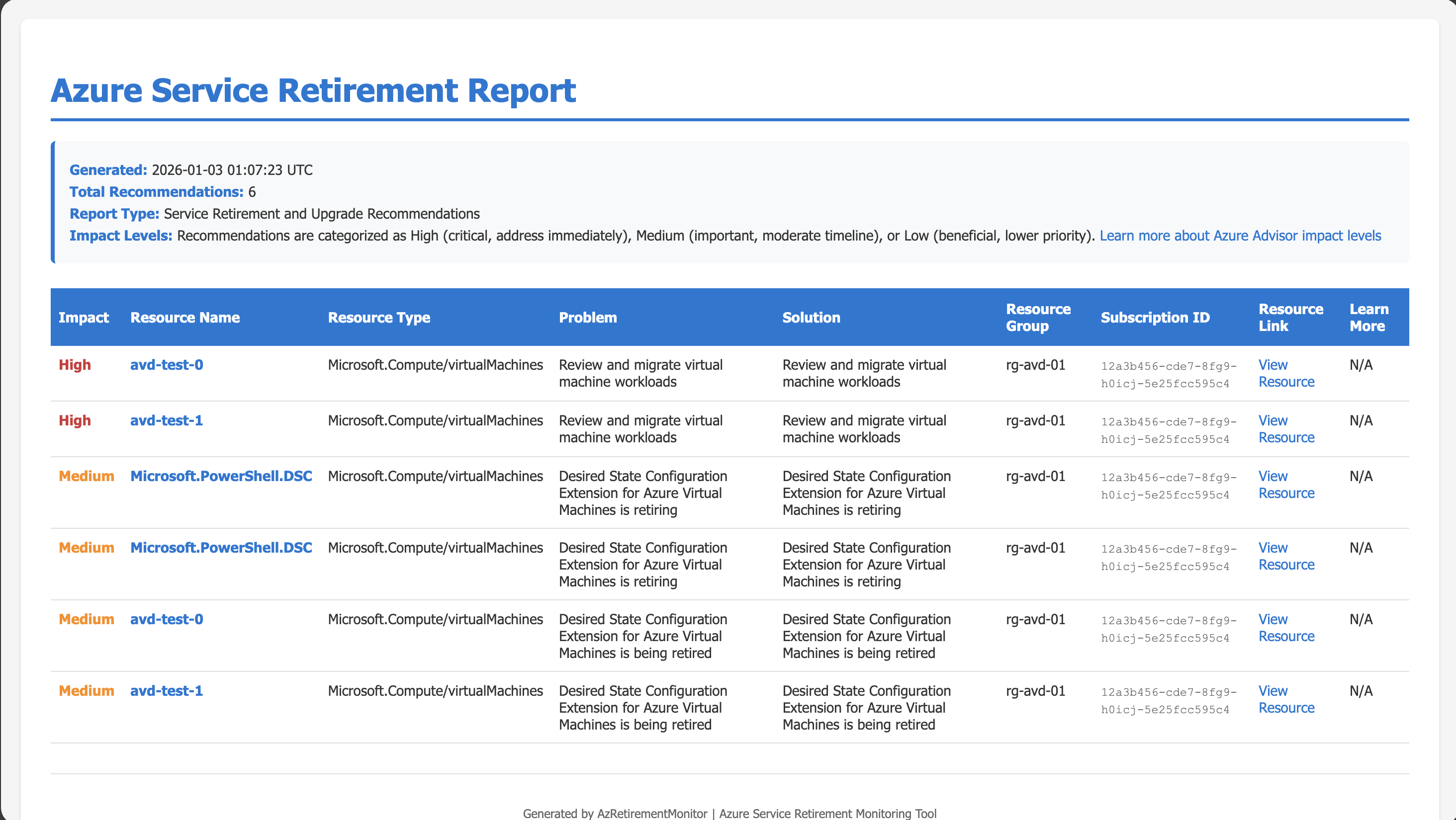 Example of a generated HTML retirement report
Understanding Retirement Metadata
To get information about retirement recommendation types:
1
2
3
4
5
# Using default Az.Advisor mode
Get-AzRetirementMetadataItem

# Using API mode
Get-AzRetirementMetadataItem -UseAPI
This retrieves metadata about retirement recommendation types from Azure Advisor, filtered for HighAvailability category and ServiceUpgradeAndRetirement subcategory, providing insights into the different types of retirement recommendations Azure Advisor can generate.
Complete Workflow Examples
Recommended Workflow (Az.Advisor Mode)
Here’s how I recommend using AzRetirementMonitor in your operations:
1
2
3
4
5
6
7
8
9
10
11
12
13
14
# 1. Authenticate to Azure
Connect-AzAccount

# 2. Retrieve all retirement recommendations
$recommendations = Get-AzRetirementRecommendation

# 3. Review critical items
$recommendations | Where-Object { $_.Impact -eq 'High' } | Format-Table ResourceName, Problem, Solution

# 4. Generate an HTML report for stakeholder review
$recommendations | Export-AzRetirementReport -OutputPath "weekly-retirement-report.html" -Format HTML

# 5. Export CSV for tracking in your change management system
$recommendations | Export-AzRetirementReport -OutputPath "retirement-tracking.csv" -Format CSV
API Mode Workflow
If you prefer using the REST API:
1
2
3
4
5
6
7
8
9
10
11
# 1. Connect in API mode
Connect-AzRetirementMonitor -UsingAPI

# 2. Retrieve all retirement recommendations
$recommendations = Get-AzRetirementRecommendation -UseAPI

# 3. Review and export as needed
$recommendations | Export-AzRetirementReport -OutputPath "report.html" -Format HTML

# 4. Disconnect when finished
Disconnect-AzRetirementMonitor
Example Output
Here’s what a typical recommendation looks like:
1
2
3
4
5
6
7
8
9
10
11
12
SubscriptionId   : 12345678-1234-1234-1234-123456789012
ResourceId       : /subscriptions/.../resourceGroups/myRG/providers/Microsoft.Compute/virtualMachines/myVM
ResourceName     : myVM
Category         : HighAvailability
Impact           : High
Problem          : Virtual machine is using a retiring VM size
Solution         : Migrate to a supported VM size before the retirement date
Description      : Basic A-series VM sizes will be retired on August 31, 2024
LastUpdated      : 2024-01-15T10:30:00Z
IsRetirement     : True
RecommendationId : abc123-def456-ghi789
LearnMoreLink    : https://learn.microsoft.com/azure/virtual-machines/sizes-previous-gen
Contributing
AzRetirementMonitor is open source and welcomes contributions! Whether you’re reporting bugs, requesting features, or submitting pull requests, your input helps make the module better for everyone.
How to Contribute
- Report issues using the GitHub issue tracker with clear reproduction steps
- Fork the repository and create feature branches for your changes
- Follow existing code style and use approved PowerShell verbs
- Add tests for new functionality in the Tests directory
- Test with both modes (Az.Advisor and API modes)
- Keep changes focused with one feature or fix per pull request
The project follows standard PowerShell module conventions and includes Pester tests. Check out the contributing guidelines in the repository for full details.
Testing Your Changes
Before submitting contributions, run the Pester tests:
1
2
3
4
5
# Install Pester if needed
Install-Module -Name Pester -Force -SkipPublisherCheck

# Run tests
Invoke-Pester ./Tests/AzRetirementMonitor.Tests.ps1
Resources
- GitHub Repository: https://github.com/cocallaw/AzRetirementMonitor
- Quick Start Guide: https://github.com/cocallaw/AzRetirementMonitor/blob/main/QUICKSTART.md
- PowerShell Gallery: https://www.powershellgallery.com/packages/AzRetirementMonitor
- Azure Advisor Documentation: https://learn.microsoft.com/azure/advisor/
- Report Issues: GitHub Issues
- Join Discussions: GitHub Discussions
Final Thoughts
Proactive monitoring of Azure service retirements isn’t just about avoiding downtime; it’s about maintaining and improving resiliency while giving your team the time needed for proper planning, testing, and migration. AzRetirementMonitor makes this monitoring accessible through simple PowerShell commands that can be integrated into your existing workflows.
Version 2.0 brings significant improvements by defaulting to the Az.Advisor PowerShell module, providing full parity with Azure Advisor while maintaining backwards compatibility through API mode for users who prefer the REST API approach. This gives you the best of both worlds: the reliability and official support of Az.Advisor with the flexibility of direct API access when needed.
Whether you’re managing a handful of resources or a massive Azure estate, staying ahead of service retirements is crucial. The module’s focused approach automatically filters for retirement-specific recommendations, saving you time and ensuring you don’t miss critical notices buried among other Azure Advisor suggestions.
Give AzRetirementMonitor a try and let me know what you think! Have questions or suggestions? Feel free to open an issue on GitHub or start a discussion.
Happy monitoring! 🚀